KruSmart — Digital Teacher Assistant
A Khmer-first teaching assistant for Cambodian classrooms: 26 modules covering enrolment, attendance, scoring, ranking, reporting and parent communication, in one installable web app.
The problem
A teacher's records are the least glamorous and most load-bearing part of the job: the roster, the attendance register, the score sheet, the ranking, the report that goes home to parents. Kept in a paper book they cannot be searched, backed up or totalled. Kept in a spreadsheet they break on the first structural change and cannot be used from the phone that is actually in the teacher's hand. Neither survives being shared.
The approach
One installable Khmer app that covers the school year end to end. A free tier gives every teacher the core roster, scoring, analysis and reporting modules; a trial and a paid premium tier unlock the output-heavy ones — seating-plan attendance, monthly registers, printable rankings, honour rolls, ID cards and certificates. Upgrades are paid through KHQR, which is the payment method teachers already use.
What it does now
KruSmart is live at krusmart.org and in daily use as a signed-in product. It currently registers 26 teacher-facing modules, of which 9 sit behind an active trial or subscription, across a five-state access model. It installs as an app on a phone and ships light and dark themes. Adoption figures are deliberately absent — none of them can be verified from outside the product.
26 Teacher-facing modules
Overview
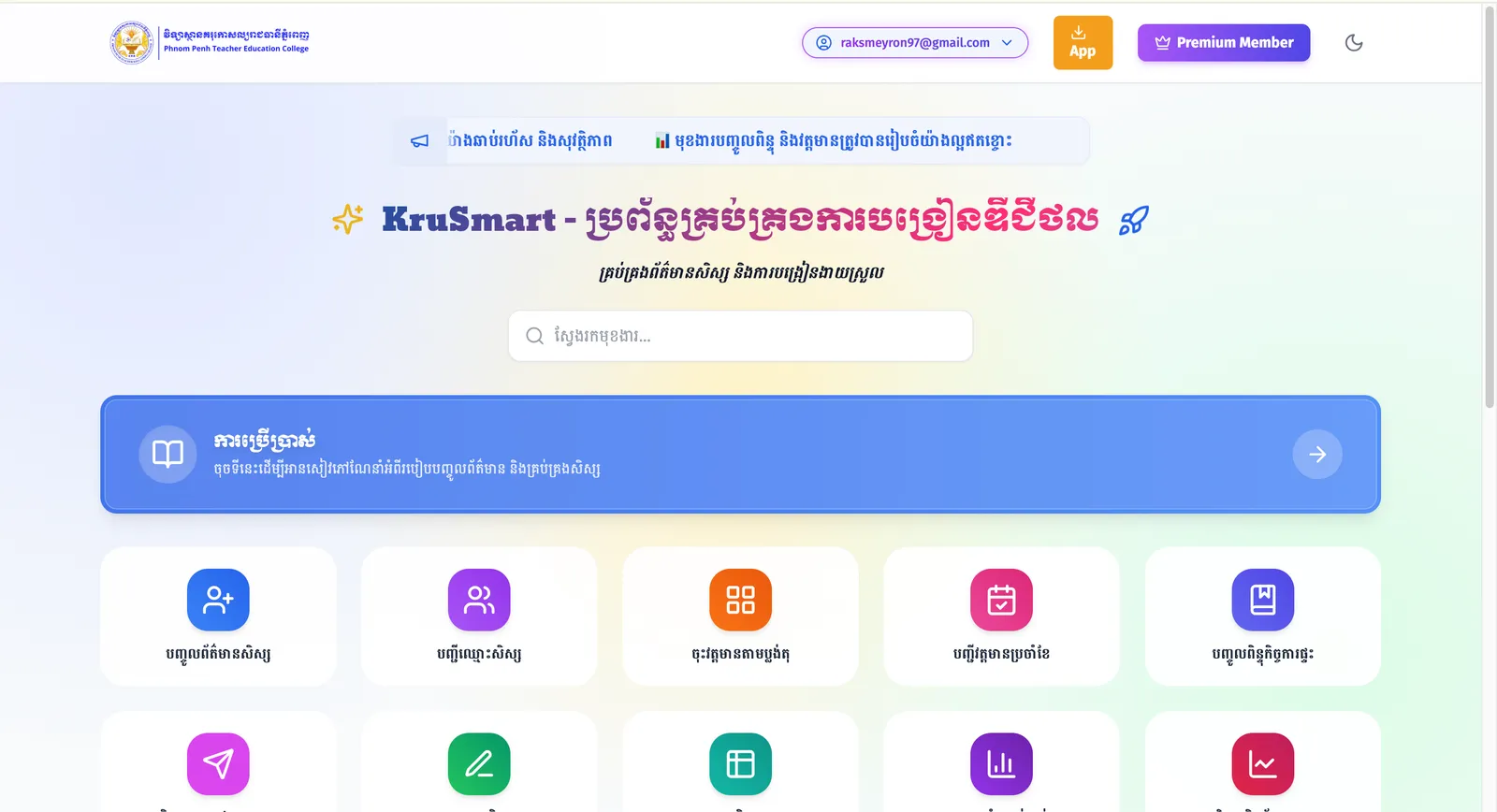
KruSmart (ជំនួយការគ្រូបង្រៀនឌីជីថល) is a digital teacher assistant built for Cambodian classrooms. After signing in, a teacher gets a searchable launcher of 26 modules covering the paperwork a school year actually produces: enrolling students, taking attendance, entering homework and monthly scores, producing rankings and honour rolls, printing ID cards and certificates, keeping tracking books, inventories and cleaning rotas, and messaging guardians.
The interface is Khmer first. English appears only as a gloss in parentheses where the term genuinely is English — Email, Password, Check-in — rather than as a second language to switch into.
Who it is for
Teachers in Cambodian schools, working mostly from a phone. An account carries a school reference, so a teacher's data is scoped to their own classes.
Goals
The product states its goal in its own metadata: to make managing student data, scores and attendance in Cambodia faster and easier. In practice that means covering the whole school year rather than one task — the modules that produce documents (rankings, honour rolls, ID cards, certificates, parent reports) matter as much as the modules that capture data.
My role
KruSmart credits me as its developer from inside the product: the account menu's "About the developer" entry links to my portfolio. I work on it as a product designer and developer. The detailed split of responsibilities is not asserted here beyond what the live product itself shows.
Responsibilities
updating
Constraints
Two constraints run through the design. Teachers work in Khmer, so Khmer is the interface language and Khmer web typography — Kantumruy Pro and Moul — is loaded deliberately rather than left to a system fallback. And the app is used on a phone, often on mobile data, so it installs as a PWA and the launcher is a searchable grid rather than a deep menu tree.
Research and discovery
updating
UX decisions
The first screen after sign-in is a searchable grid of modules, not a dashboard of numbers — a teacher opening the app already has a task in mind, and search reaches it in one step. Premium modules stay visible to free users and open an upgrade dialog rather than disappearing, so the product never hides what it can do. Sign-up is a single form with live feedback: a password-strength meter that updates as you type, an immediate confirm-password mismatch warning, an explicit terms checkbox and an arithmetic challenge in place of an opaque widget. Verification is a six-digit code in a modal rather than a round trip to an email client. Light and dark themes are resolved before first paint, so there is no flash of the wrong theme.
Architecture
A client-rendered application on Netlify with Firebase behind it — Firebase Authentication for accounts, Cloud Firestore for data, imported as ES modules directly from Google's CDN rather than bundled. There is no build step between source and browser: /core/app.js holds the module registry, /core/auth.js the sign-in flow, /core/access-control.js the subscription rules. Paid upgrades go through a separate KHQR service on Render — KHQR is Cambodia's national QR payment standard — which keeps payment handling out of the application. Transactional email goes through EmailJS, and the Content-Security-Policy also allowlists Google Analytics, reCAPTCHA and the Google Gemini API.
Database decisions
Data lives in Cloud Firestore under a single application namespace, keyed by the signed-in teacher's uid, with the school reference stored on the teacher record — that link is what scopes a teacher to their own classes and what the geofenced check-in measures against. Subscription state is stored on the user document and re-read from Firestore every time, never from local storage. The access-control module says so in its first line, and that is the right instinct: a tier cached in the browser is a tier the browser can edit.
Key features
Every feature below is registered in the application's own module list or its access-control rules.
Security
Registration is guarded by an arithmetic bot challenge, a password-strength requirement and explicit terms acceptance, then confirmed by a six-digit code before the account is usable. Entitlements are resolved from the Firestore user document rather than from local storage, and a banned role is a first-class state alongside the subscription tiers. The response carries HSTS with preload, X-Frame-Options SAMEORIGIN, X-Content-Type-Options nosniff, a referrer policy, object-src 'none', base-uri 'self' and a Content-Security-Policy that pins every third-party origin the app may talk to. On the entry document, Permissions-Policy switches off camera, microphone and geolocation.
Accessibility
The page opens with a skip-to-content link written in both Khmer and English. Decorative icons are hidden from the accessibility tree, the upgrade dialog is a real dialog with role and modal semantics, and password fields carry visible show/hide controls labelled in Khmer. Dark mode is a genuine second theme rather than an inverted filter.
SEO
KruSmart is a signed-in product, so its public surface is one page and its SEO job is narrow: say what the product is, in Khmer, to people searching in Khmer. The entry document carries a Khmer title and description, Khmer and English keywords, Open Graph tags and a theme colour, and the PWA manifest gives the installed app its own name and icon.
Performance
The app ships no framework bundle: HTML, CSS and ES modules served from Netlify's edge, with Firebase and the icon set pulled from CDNs. The sign-in module starts loading its email dependency in parallel with the first Firestore read rather than after it, and the theme is resolved before first paint. The result is a first screen that does not wait for a JavaScript framework to boot — which matters most on the mid-range phones the product is used on.
Challenges
Transactional email is the interesting one. Verification codes have to arrive reliably from a free tier with a hard monthly quota, so the app does not depend on a single sender: it keeps a pool of EmailJS accounts in Firestore, tries them in turn, and fails over when one is exhausted — reporting a clear message to the teacher and the administrator when the whole pool is spent, rather than silently dropping the code.
What I learned
Create new generations of teachers in Cambodia
Next improvements
Improving system
Key features
Searchable launcher of 26 modules
The first screen after sign-in is a searchable grid of every module, not a dashboard — a teacher opening the app already knows what they came to do.
Student enrolment and class rosters
Enrolment forms, the class roster, age and height analysis, and per-student access codes that guardians can use.
Attendance, including seating-plan mode
A monthly attendance register and an attendance mode laid out as the classroom's seating plan, so marking follows what the teacher is looking at.
Homework and monthly score entry
Score entry for homework and for the monthly assessment, feeding a consolidated subject score table.
Per-student and per-subject analysis
Two analysis views over the same scores — one following a student across subjects, one following a subject across the class.
Rankings, honour rolls and printable documents
Printable class rankings, honour rolls, student ID cards and certificates — the paperwork a school year has to produce, generated rather than retyped.
Parent reports and guardian messaging
Parent-facing reports, homework sent to guardians, notifications, and access codes that let a guardian look up their own child.
Geofenced teacher check-in
Check-in compares the teacher's current position against the school on their account record, using a great-circle distance calculation in the browser.
Five-state access model
Free, trial, premium, admin and banned — resolved from the user's database record on every read, never from local storage, with 9 modules gated behind an active subscription.
Account security and verified sign-up
A password-strength meter, an arithmetic bot challenge, explicit terms acceptance, Google sign-in, and a six-digit code before the account can be used.
Installable, Khmer-first, light and dark
A PWA manifest with its own name and icons, Khmer web typography loaded deliberately, and a theme resolved before first paint.
Measured results
Only figures with a recorded source are shown.
- 26
- Teacher-facing modules
- 9
- Modules behind a subscription
- 5
- Access states
Counted from the application's own module registry in /core/app.js.
Jul 2026
Counted from the LOCKED_FEATURES set in /core/access-control.js.
Jul 2026
free, trial, premium, admin and banned — the states returned by resolveTier() in /core/access-control.js.
Jul 2026